Platform

It does not stop at an answer.

Carcin researches, plans, builds, connects, drafts, monitors, and executes. It works through connections to the software you already pay for, curated tools, packaged skills, business memory, and loops that keep running.

An abstracted Carcin workspace: chat on the left proposing a weekly review-reply loop, a work log filling in on the right: listing corrected, search pages drafted, a review answered, a site fix done
Fig. 01 · The workspace, abstracted
27
Business systems ready to connect
Calendar, inbox, books, ads, analytics
260+
Curated operations Carcin can perform
Read and write intent declared per tool
17
Production skills
Research, content, websites, reporting
1,400+
More systems within reach
Reviewed before activation

Counts verified against the running product, as of 2026-09-02.
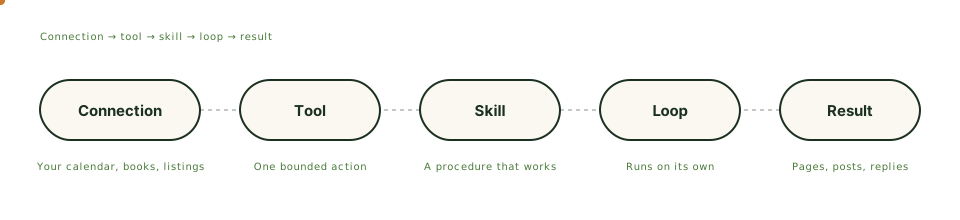
How work gets done

From a connection to a finished result

Five linked steps: connection, tool, skill, loop, result
Fig. 02 · The work chain

Connections

Bring approved business systems into reach. Email and calendar, documents, analytics and search, advertising and social, websites and publishing, operations, finance.

Tools

Perform one bounded operation each. Every tool declares whether it reads or writes, so what Carcin can change is never a surprise.

Skills

Encode repeatable professional procedures with quality checks: site audit, competitive brief, campaign plan, email sequence, performance report, migration.

Memory

Keeps company context scoped to its workspace. Upload documents, and Carcin uses them for your business only.

Loops

Carcin proposes recurring work in chat. You activate it once. It keeps running: reviews, listings, reports, inbox triage.

Your own environment

All of it runs in a workspace provisioned for your business alone, at the edge, close to your customers.

Provisioning

Built for your business in about a minute

Sign up and Carcin provisions a workspace that is yours: an environment, a memory, an address. Then it picks the first job that pays and starts opening channels in the order that compounds.

Ready in about a minute · No card · Never expires

A business is entered, a private workspace is assembled with its own environment, memory, address, and connections, and work flows out to search, listings, reviews, email, and ads
Fig. 03 · How a workspace is built
Already have a site

Move off WordPress without losing a page

Carcin includes a migration path: a plugin that extracts your content, a parity audit that checks every page and ranking made it across, and a cutover step that flips the switch cleanly. Your old site keeps running until the new one is proven.

Extract · Rebuild · Audit for parity · Cut over

A business owner checking a package with a phone next to a laptop
Your business, run from your phone. Carcin runs the rest.
FAQ

Platform questions, answered

01 What is a connection?
A business system Carcin can reach on your behalf: your calendar, inbox, books, ad accounts, analytics, social profiles. 27 are ready to connect today. 1,400 more are within reach and reviewed before activation.
02 What is the difference between a tool and a skill?
A tool performs one bounded operation, like reading a review or drafting a reply. A skill is a professional procedure that uses many tools in the right order, like a full site audit or a competitive brief.
03 What is a loop?
Recurring work Carcin proposes, you approve once, and it keeps running: review replies, local listing posts, weekly reports, inbox triage.
04 Does the free tier get all of this?
Yes. Every tier is the full product. Tiers change how much work is included each month, and paid tiers run a frontier model with web research.
05 Can Carcin move my existing site?
Yes. Carcin includes a WordPress migration path with a parity audit, so nothing is lost on the way over, and a cutover step so the switch happens cleanly.
Features

The parts, named

A business enters, a private workspace is provisioned with its own environment, memory, and address, connections come online, and work flows out to search, listings, reviews, email, and ads.
Workspace

A private operation, provisioned for you

Its own environment, memory, and address. Every job runs inside it and reads what the last one learned. Ready in about a minute.

How it works →
A workspace at the center with six category tiles, calendar, books, listing, reviews, email, and ads, all connected with a check mark and a result chip showing corrected hours.
Connections

27 ready connections, 1,400+ within reach

Your calendar, your books, your listing, your reviews, your email, your ads. 27 ready today, 1,400+ within reach, reviewed before they switch on.

How it works →
Five nodes light in order: a connection brings a system into reach, a tool performs one bounded operation, a skill runs the procedure, a loop keeps it on schedule, and a finished result appears.
Tools

260+ operations, one job each

Correct a listing, answer a review, publish a page, send a campaign, pull a report. Each tool does one bounded thing and shows its result.

How it works →
A five-step procedure card checks off in order beside tool chips lighting up in sequence, ending with a finished report sheet stamped done.
Skills

17 procedures, run start to finish

A local search audit, a content brief, a competitor brief, a monthly report. Each skill sequences tools into one finished piece of work.

How it works →
A copper dot orbits a small weekly loop. Each pass draws a line to a job card, reviews answered, listing checked, report sent, that fades in and checks off, with a pause chip visible the whole time.
Loops

Say yes once. It keeps running.

Carcin proposes the recurring work in chat, replying to reviews, keeping a listing current, sending the report, and one tap turns it on or off.

How it works →
A memory frame holds rows for business, voice, customers, documents, and what worked, plus an empty next lesson row. A dot reads a row, then writes into it, filling in with a note and a Learned tag.
Memory

What it knows about your business

What you sell, how you talk, what worked, what you said, and the documents you keep, in one place every job reads and writes.

How it works →
A report sheet with its title is ready from the start beside five source tiles: Listing, Reviews, Search, Email, Ads. A line draws from each tile to its row in turn, until a Sent, Friday stamp lands.
Reports

One sheet, on a cadence

What changed, what Carcin did, and what to do next, on the cadence you set. One sheet instead of five dashboards.

How it works →
A chat proposes a weekly loop to reply to reviews and its chip checks when activated, while a work log fills in beside it: listing corrected, pages drafted, a review answered, email scheduled.
Chat

Say it once. Watch it get done.

Type what happened in plain words. Carcin answers, proposes a loop, and starts the work while the log fills in beside you.

How it works →
A business sits inside its own workspace with environment, memory, and assets. Identity is checked at the boundary. An approved connection crosses; an unknown request is turned away.
Boundary

One business. One boundary.

Identity checked on the server, connections scoped to you, assets encrypted, every action logged. The controls running today, nothing promised.

How it works →

All features →

More than a chat window. Hire it.

Every tier is the full product. Start free and see the work.

Start free with 100 credits · No card required · Keep everything Carcin builds