You bill hours, not marketing time. Carcin keeps the firm's site, listing, and reviews current in the background, so the next intake call finds a firm that looks as sharp as the work.
The trigger
Moments you reach for help
A competitor's ad outranks your name
Someone searches your firm's name and a rival's ad shows above your own listing.
A caller asks about a case type you handle
You take the case, but there's no page that would have told them you handle it before they called.
A review naming your firm sits unanswered
Good or bad, it's the first thing a prospective client reads before they call.
What Carcin does
Week 1 to month 3
Week 1
Google Business Profile claimed and corrected.
Reviews from the last 12 months read and answered.
Site fixed with practice-area pages and a consult booking link.
Month 1
Weekly blog posts on practice-area topics clients search for.
Keyword-gap brief against the two closest firms.
Intake email sequence drafted and sent.
Month 3
Monthly performance report.
Ads only if they pay for themselves.
Loops running for reviews and listing accuracy.
Great at the case. Carcin runs the front office.
What you see
Everything, in your workspace
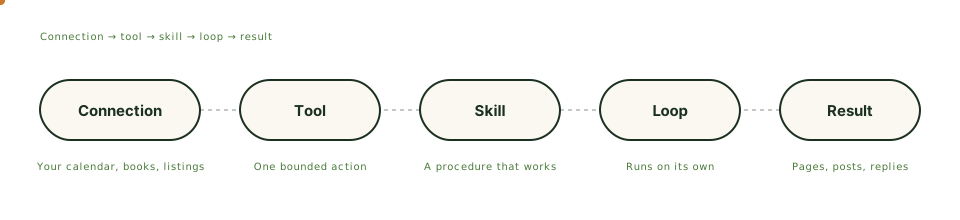
Fig. 01 · The work chain
Everything Carcin does shows up in your workspace as it happens. Loops are proposed in chat, and you activate them once.
Usage-based pricing starting at $19.99/mo. Pro runs $99.99/mo and Max runs $199.99/mo for firms that want more work done each month. Every tier is the full product. The free tier starts with 100 credits, no card required, and never expires.
02Do I need to write anything myself?
No. Carcin drafts the practice-area pages, the blog posts, and the review replies. You read them before they go out and can rewrite anything in your own words.
03What if I already have a site?
Carcin audits it and fixes what is costing you intake calls. If it runs on WordPress, Carcin includes a migration path with a parity audit and a clean cutover, so nothing gets lost on the way over.
04Can it handle consult bookings through my existing scheduling tool?
Carcin connects to scheduling and calendar tools among its 27 ready connections and drives site visitors straight to your consult booking page. It does not replace the scheduling software you already use to book consults.
Built in
The parts that do this work
Boundary
One business. One boundary.
Identity checked on the server, connections scoped to you, assets encrypted, every action logged. The controls running today, nothing promised.